Available Features
Maze Master Games bundles three great games into one package.
Write your Own Trivia for Groups
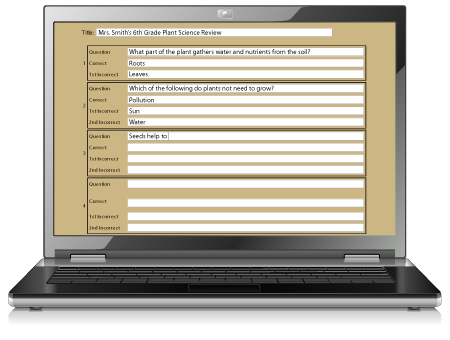 This classic feature was the item that launched mazetrivia.com as Maze Master Trivia (MMT) back in 2010. MMT allows group leaders to write their own trivia questions online and print copies for each group member. Before the season you (the maze owner) tell the Maze Master how many checkpoints are in the maze, what turn options are available at each checkpoint (left, straight, right), and which is the correct answer. Then, the visiting group leader simply visits your maze's trivia web page before the visit and provides a question, correct answer, and one or two incorrect answers for each checkpoint in the maze. The Maze Master software will then automatically match up the leader's correct answers to the correct directions in the maze. The leader hits print, makes enough copies for the group, and visits your farm. Pre-written categories are also available for the leader or for you to print cards for the general public.
Smartphone Games
Choose Trivia, Punch card, or both, plus add on Maze MapSmartphone Trivia
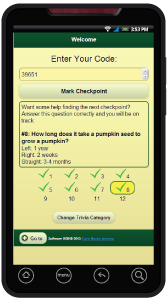 Allow visitors to your maze to access all pre-written trivia categories on their mobile phone. Rather than using a printed trivia card they can choose from more than 60 pre-written categories and see the questions as they progress through the maze. Once you setup your maze for group leaders to write their own questions your account is automatically setup to allow trivia questions too!
Smartphone Punch Card
Make your checkpoint punches go digital with the Smartphone Punch Card. Visitors use their mobile phone as their punch card at each checkpoint in the maze. They scan a QR code or enter a 5 digit number into the special game web site. The phone tracks their progress and lets them enter a contest or receive a coupon upon completion. Plus, you can give them the option to track their time to see if they make the fastest times online wall! (Fastest times can optionally be disabled)Static Maze Map
Let your customers see a maze map right on their phone. Simply upload your maze map image and visitors playing Smartphone Trivia and/or Smartphone Punch card can check their map. They will have access to see the map on their phone scaled to the size of their screen. (Static Map can optionally be disabled)Smartphone GPS
Smartphone GPS may be the coolest feature to ever come to corn mazes. Let visitors see their precise position in the maze at any given time using the GPS in their mobile device. Visitors will see a fun character overlaid on their position on a map of the maze.Smartphone GPS is a premium product and requires an extra fee. To help maintain high standards for Smartphone GPS, we handle the final setup and upload of all files for this feature. For more information or to setup your Smartphone GPS, visit the pricing section or contact us directly at sales@cornmazesamerica.com. We highly recommend you contact us before ordering this feature.
Easy Setup
Setting up your maze is easy, and if you get stuck we are happy to provide free one-on-one support to help you get everything configured just how you need it. Everything is setup with an easy to use online user account to make setup fast and easy. Plus, you never need to install any software or make changes to your website.
Create Maze
First you will log in and create a new maze. Here you will define basic settings such as the name of your maze, upload your maze map, customize some wording, and create a contest or coupon for visitors that finish the maze.Setup Trivia
If you will be using trivia for either group leaders to write their own questions or Smartphone Trivia, you will need to setup each checkpoint and tell the Maze Master what options are available at each checkpoint (left, straight, right) and what the correct answer should be. You will complete this with an easy form.Setup Smartphone Punch card
This step is simple. Just enter the number of checkpoints in your maze and all your codes and QR codes are automatically created for you.Submit GPS Data
If you purchased the add-on Smartphone GPS features for your maze, you will need to submit your GPS files to use for setup and upload. For more information or to setup your Smartphone GPS, visit the pricing section or contact us directly at sales@cornmazesamerica.com.
These three to four steps are all it takes to get setup and should take about 15-30 minutes to complete once. Your software is now live!
Just like any maze game, there will be a little bit of setup in the maze that you will need to complete:
Make Signs
If you will only be using trivia in the maze you will only need your checkpoints to be numbered in the maze and placed correctly for your turn information. If you will be using the Smartphone Punch card, you will need more information on your signs including the QR code and/or 5 digit checkpoint code. You will also need an entrance and exit sign.
You have three options to make great looking signs for Smartphone Punch Card.: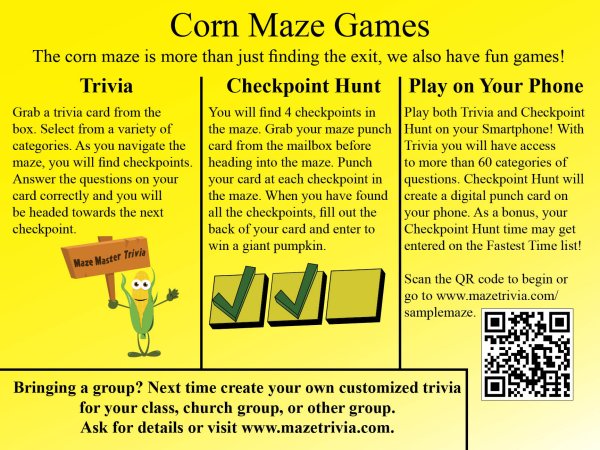
- Let us do the work. For a very low fee we can design full color signs for you. We then submit them to a local printer who will print them on your choice of weatherproof plastic or aluminum sign material and ship them directly to you.
- Use your online Sign Builder tool. This free online tool provides a starting template to add custom text, and it automatically adds your required QR codes. Sign builder makes a PDF of each sign to submit to your local professional printer or to print yourself.
- Create your own signs from scratch using the information we provide. Your account allows you to download all your QR codes for you to place on your own custom signs. Some farms use this option to make small stickers that can be applied to existing signs in your maze.
Print Trivia Cards (Optional)
Even with smartphone features some customers will still want to play on paper. Choose 2-6 categories and have pre-made trivia cards available for them. Use the built in trivia features to create these cards on two different layout styles in seconds.Create Paper Punch Cards (Optional)
Certainly not every customer will be ready for smartphone use. Offer your map and punch card on paper for those customers. We sell punches and design custom punch cards at a great price to help you along, or use your own system.Train Your Staff
While all employees do not need to know the specifics of the entire program, make sure ticket people and maze staff know how the mobile features work. Help your staff provide a great guest experience.
Add on Materials
We provide great support for our games, but your maze may need some other supplies. As corn maze experts we are here to help!
Signs
 Let us design and create outdoor weatherproof signs for your maze that look very professional. We can also design custom signage for other areas of your farm.
Outdoor Punches
Our outdoor punches are designed for exposure to the weather and do not rust. Get more details or order at www.cornmazesamerica.com/games.php.Maps/Punch Cards
Let us layout a color punch card and map combination that looks great. With a variety of sizes and quantities to choose from, we can print full color glossy heavy stock cards for as little as $.05 each. See our printing pack for prices and samples.
Pricing/Order Now
Maze Master Games
$300/year
for basic plan
Maze Master Games come at one low flat yearly fee of just $300/year. You get features #1 & #2 including:
- Custom trivia creation for groups
- Smartphone trivia
- Access to more than 60 categories of questions
- Smartphone punch card features
- Smartphone map
- Unlimited visitors
- Sign Builder Tool
- Complete online management account
- Contest entry form data access
Smartphone GPS
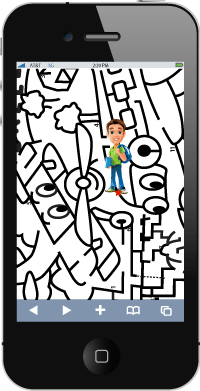
Smartphone GPS is an amazing new tool, and it can be a great addition to our other smartphone games or to other games that already exist in your maze. In 2013 we saw farms launching this product with great success. Because this feature is quite different than our other games, this game is sold as an add-on or stand alone option from our other games. In fact, the GPS now has it very own website at www.mazegps.com. But don't worry, mazetrivia.com and mazegps.com are seamlessly intergrated to give you a completely clean interface for your users. If you are using the other smartphone games, the GPS is built right into your game. If you use only the GPS, your guests can load and experience the technology straight from mazegps.com.
This app is one of a kind, and we are setting the bar high for a top quality experience for visitors with minimal work from you. When you purchase Smartphone GPS, we upload your map and place it perfectly in the field. You simply submit your map and raw data and we will convert it into a format for web and upload it. Even if your maze was not cut with GPS or you cannot get access to the GPS files, we can setup smartphone GPS for your maze.
How do I get raw GPS data to submit?
There are two ways to create GPS data to submit:
- A: Ready Made Files: Certainly the best option is to go straight to the source when possible. If you cut your maze using GPS or your maze company cuts your maze using GPS it may already be in a file format that we can work with. We now accept a wide range of formats including .shp, .kml, GeoJPG, GeoTIF, and many other formats. Submit your file or ask your maze designer to give you a copy of the file. While some maze companies may be hesitant to hand over this information, remind them that you or they still retain all copyrights to the design and we are only allowed to use the files you provide for the use of your Smartphone GPS setup. Check with us for specifics about the types of files we accept. All Corn Mazes America cutting customers or farms who purchased referencing services from us for their maze cutting are eligible for this option. If you cannot get your GPS file, don't despair. We can always go with option B.
- B: Walk the Maze: If you do not have access to your GPS files or your maze was not even cut with GPS, we can still create a GPS file for you. We will provide you access to a special online tool with our mazegps.com software. You simply load up our web app on your phone, press record, and walk the paths in your maze. Walk as many paths as possible to give us the best idea of where the paths are in your maze. Then, we will place a clean map in your field matching your map to the virutal map you created by walking. We provide our custom recording app for free!
Files that were used for original cutting always provide the most precise results. Handheld and Smartphone GPS units have a built in inaccuracy of 5-30 feet or more depending on the unit. We will do our best to match your map with these methods but we cannot guarantee precise precision.
GPS Pricing
Smartphone GPS pricing is now better then ever! The software and setup is now included in one fee for just $300/year. No more referencing fees! Or, get the full package of Maze Master Trivia, Maze Master Smartphone Games, and Maze Master Smartphone GPS for $500/year. This is one of the most affordable packages on the market.
To order a GPS package, please contact sales@cornmazesamerica.com so we can confirm your GPS file type and other settings before ordering.